
Quirky Xerus for the Raspberry Pi
October 24, 2016 - Barry Kauler, creator of Puppy and Quirky Linux, released his latest Quirky Xerus version 8.1 for the Raspberry Pi. (Updated to 8.1.2 on 25 November 2016.)

Quirky Xerus 8.1.2 for the Raspberry Pi is:
- built with Puppy Linux kit and Ubuntu 16.04 Xenial Xerus binary DEBs;
- a 360-MB Linux distro with LibreOffice, Inkscape, Seamonkey (Mozilla browser with composer), and many other applications;
- able to auto-update via Filesystem - Upgrade Manager;
- a fast GUI using JWM and ROX-Filer for the desktop;
- the first build by Barry Kauler for the ARM platform, specifically the Raspberry Pi 2 and 3;
- easy to install to micro-SD card, just decompress and write the IMG to 8-GB micro-SD card;
- available for download from ibiblio.org and nluug.nl.
Read this to explore the more technical aspects of Quirky Xerus.
Follow the Forum discussion of the Quirky Xerus release.
Read about the Raspberry Pi.
Added by raffy November 25, 2016 (12:15AM)
Tahrpup CE is Released
February 6, 2015 UPDATE - Note that the new files are numbered 6.0.2.
October 26, 2014 - Tahrpup 6.0 is released by 666philb in the Forum.

Tahrpup uses Ubuntu 14.04 LTS Trusty Tahr packages and includes the bugfixes and improvements from the woof CE build system. It is compatible with Ubuntu 14.04 packages. The Linux kernel version is 3.14.20.
Explore the Tharpup folder at ibiblio or nluug for downloads (Try the PAE build first).
Report bugs in the Forum.
Added by raffy October 26, 2014 (10:00PM)
Fatdog64 Releases and Updates
October 26, 2014 - QUICK UPDATE: Fatdog64 700 beta 2 is released, see the Forum discussion.
Since July 2010, Kirk and Jamesbond have been releasing new versions and updates of Fatdog64 (64-bit Puppy Linux). Each major release has matching PETs and SFSs. Go to Fatdog64's website for a quick start.

The Linux kernel is always the cutting-edge version at the time of release and the window manager is Openbox /LXPanel. Fatdog has always included the latest Firefox, GIMP (image editor), and KINO (video editor). Its default wallpaper started with the classic Seagull that was with Puppy Linux version 1. Fatdog may be traditional in looks but it is bleeding-edge in content!
Download the newest ISO from ibiblio (click here to open the ISO folder) - note that the most recent build uses the highest version number. Additional packages like PETs are installed from the package manager, while SFS can be downloaded from here - to use SFS, copy to /mnt/home and reboot (this assumes that you are already using a save file). Read here about the SFS.
Comments (0) Added by raffy October 26, 2014 (9:40PM)
Precise Puppy is Released
August 3, 2013 - A version 5.7.1 update of Precise Puppy is now available. Precise Puppy is a Long Term Supported release, following Ubuntu Precise Pangolin's LTS attribute. The kernel version of the standard release is 3.9.11 (PAE, i686) while an older kernel 3.2.48 (i486, no PAE ) is used with the retro release (the retro has many device drivers, including analog modem drivers).
Download the STANDARD precise-5.7.1.iso here or there, size = 156 MB, md5sum = c4999c4bd8ca3a8fc935389c2667f848.
Download the RETRO precise-5.7.1-retro.iso here or there, size = 201 MB, md5sum = 8c1d7db20a055fe847ed954fc246e078. NOTE: This has additional drivers, including analog modem drivers, and has Opera as additional browser for PCs with 256 MB or less random-access memory (RAM).

Precise Puppy 5.7.1 boots with a new Xorg Video Wizard that can recover from blackout/reboot at first boot.
Read more about Precise Puppy 5.7.1, visit the forum discussion, or check for updates by searching for "precise" in Barry's blog.
Read more... Comments (0) Added by raffy August 3, 2013 (10:00PM)
New Wary Puppy is Released
March 3, 2013 - System-level updates for WaryPuppy (home-grown Puppy for older PCs) have been made by Barry Kauler, creator of Puppy Linux. Open this folder for ISO download and release notes of the new WaryPuppy version 5.5.
April 5, 2012 - Wary Puppy 5.3 is released, see the announcement by Barry Kauler. There is now greater support for internationalization, and lots of bugs have been fixed. Language "langpacks" are now available with included translations for both the system and applications. It has also been updated to version 2.6.32.59 of the LTS kernel.
Download wary-5.3.iso here or there, size = 136.7 MB, md5sum = d8b496afe0970a124fa69a62dd608801
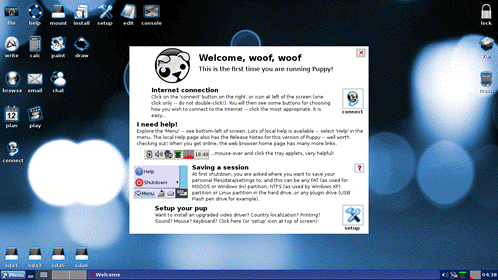
Wary 5.3 runs well on old PCs, but it can upgrade display for new PCs with the new Xorg 7.6 - try Menu-Setup-Video Upgrade Wizard. The screenshot shows the Wary desktop.
Read more about Wary Puppy 5.3, visit the forum discussion, or check the Wary updates.
For former releases and additional list of Wary characteristics, read more below:
Read more... Comments (0) Added by raffy March 3, 2013 (7:30PM)
Install Puppy Linux in Windows
Use EXE installer to install Puppy Linux in Windows PC. This involves downloading an exe installer and then clicking on it (the usual way of installing programs in Windows). Find the version you like through the links below:
- EXE downloads at Mediafire - see the author's discussion (note that Lucid Puppy is version 5.28, Slacko is version 5.5, and PAE is for high-memory machines);
- EXE downloads at Shinobar's mirror - see the author's discussion.
The installer will add (1) Linux to your Windows boot dialogue and (2) Grub menu for choosing how to use Puppy Linux. Also, two directories will be added to your hard drive: a "boot" directory containing the boot scripts, plus a "puppy" folder containing the Puppy Linux files.

Windows boot dialog after installation

Grub menu for options in booting Puppy Linux
(Don't use save file when making its backup or investigating problems.)
Comments (0) Added by raffy March 3, 2013 (9:59AM)
Lucid Puppy 5.2.5 is Released
April 2, 2011 - Lucid Puppy 5.2.5 is released!Download version 5.2.5 from ibiblio.org: Get lupu-525.iso or explore the folder.
Download version 5.2.5 from nluug.nl: Get lupu-525.iso or explore the folder.
MD5 Checksum: b6658ab75cd5d48f358f0ee31b06b934
ISO Size: 128MB

Lucid Puppy 5.2.5 desktop with first-run and browser wizards.
New in Lucid Puppy 5.2.5 (released April 2, 2011):
- Bash 4.1.0, Syslinux 4.03, e2fsprogs 1.41.14, JWM 500, Gnumeric 1.10.13;
- updated PBurn and Gnome-MPlayer 1.02;
- built from Woof of February 26, 2011.
Lucid Puppy 5.2 (released January 5, 2011):
- is still compatible with Ubuntu packages;
- has QuickSet for point-and-click desktop configuration;
- has QuickPet for updates, diagnostics, and package installs;
- has alternative window managers (XFCE, Fluxbox) through the package manager;
- includes language packs for 11 different languages;
- a true Puppy Linux built using Woof, the magical build script of Chief Developer Barry Kauler.
Announcement and Release Notes
Forum discussion
Tips and Tricks
Comments (7) Added by raffy April 2, 2011 (7:10AM)
XOpup 1.0 is Released
October 17, 2010 - XOpup 1.0 is released. The XOpup is a result of almost a year of labor and advocacy from forum member mavrothal - see the Forum announcement.
Mavrothal was glad that his persistence plus the help of developers finally led to this release. He acknowledges the help of "01micko with crucial input from Mitch Bradley, Anna, Paul Fox, Edie Owens and ttuuxxx".
Mavrothal continues: XOpup-1 is based on Puppylinux 5.1.1 with several customizations to fit the hardware. In addition to the custom kernels and under the hood optimizations, it includes custom desktop, quickpet, first-run screen, battery monitor, touchpad widget for XO-1, swap-file maker and power management. It also includes other goodies like the free-memory deamon, the lupu-511 "light" version of the Midori browser as default, and all the standard Puppylinux 5.1.1 applications and programs.
Download XOpup 1.0
[tar.gz] 114 MB, md5sum = e01bced2c4d24677119291ec3a3ef501
The compressed tarball shall be expanded to a DOS/VFAT or Linux/Ext2-3 formatted USB or SD flash and used to boot the XO-1 or XO-1.5. Read more details in the build announcement.
For feedback, visit the Forum
Comments (0) Added by raffy October 17, 2010 (7:10PM)
Puppeee 1.0 for the eee is Released
August 7, 2010 - Puppeee, amazing distro for the eeePC, is released.
In the puppeee home page, Jemimah wrote: Puppeee is an ultralight, user-friendly Linux distribution for the EeePC
Puppeee should work on EeePCs with Intel GMA900, GMA950, and GMA3150 graphics cards. This is most 10 inch or smaller models. There is partial support for the 1101HA/1201HA with the GMA500 using Xvesa.
Jemimah has described Puppeee's development in the Forum: Puppeee comes with a custom ultralight preemptive kernel optimized specifically for Atom or Celeron processors - the result is fast boot time, high performance, and low power usage.
Download Puppeee and read the install instructions given in the same page. For feedback, visit the puppeee forum.
Read more... Comments (1) Added by raffy August 7, 2010 (6:00PM)
Quirky is Released - Barry's Testing Platform
 June 5, 2010 - Quirky 1.20 is released. Get the qrky-120.iso from here and read Barry's announcement. Note: qret-120.iso is the retro version (using the kernel of version 4.3.1).
May 5, 2010 - Quirky 1.00 is released, a 106-MB test platform for cutting-edge features of Puppy Linux.
Q1.00 is a multimedia special that should be able to play most multimedia formats. It also supports 3G modems.
The Linux kernel version is 2.6.33.2 and the default window manager is Openbox with Fbpanel (JWM is also available).
The builder of Q1.00 is "Woof", Barry Kauler's scripts for building a Puppy Linux distro from another distro's binary packages. However, Q1.00 is "home-grown" as Barry used binaries that he himself built from T2.
With Q1.00 released, a home-grown Woof-let, other Puppy Linux devs can use its tested features to deliver new Woof-lets from mainstream distros, benefitting the user with a wide array of packages while keeping the OS compact.
See Barry's announcement and go to the download folders at ibiblio.org or nluug.nl. Get quirky-100.iso, 106 MB, md5sum = ed663f31c5ac2f4ae4819dcf3b8d2199
For feedback, visit the Forum.
Comments (1) Added by raffy June 5, 2010 (6:07PM)
